ZTE Axon 7: A Six-Month Review

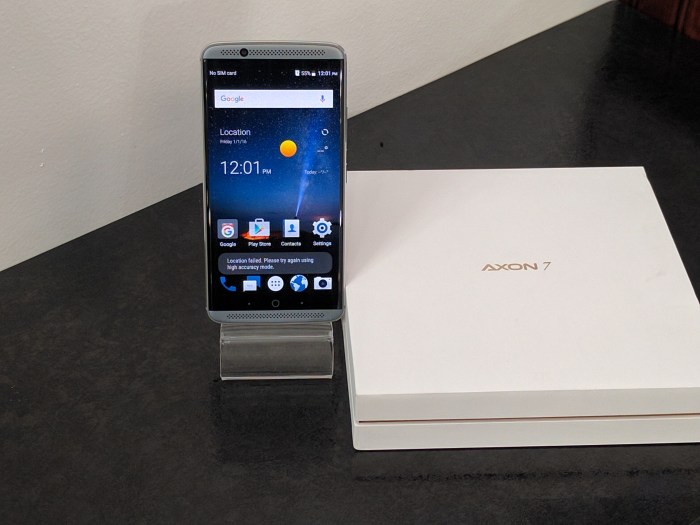
So, 2017 is finally upon us, and one of my New Year’s Resolutions remains giving credit where credit is due.  Because of this resolution, it is time to give credit to the folks at ZTE for engineering a magnificent device, full of the pillars that make a smartphone great.  As I have been using this as my daily driver regularly for four of those six months, I felt it was my duty in helping you decide if this is the phone for you.

Sporting the now one-generation old Qualcomm Snapdragon 820, an Adreno 530 GPU, and 4GB of RAM, calling this a buttery smooth experience might be an understatement.  Even after the six months of installing and removing apps, playing games, tweaking the camera, making phone calls, and customizing the user interface (UI), this thing still hums along like a newborn.  Mixed with the proper amount of inertia dampening, flying through all home screens, streaming through your app drawer, or breezing through website on your browser of choice will be silky smooth.  In comparison to the current Snapdragon 821, you will find negligible slowing, as the 820 still proves as a powerhouse among processors.  In everyday usage, playing intensive games such as Marvel Legends with no problems was a constant.  I also attribute this to the fact ZTE clocked the processor in at a higher 2.15Ghz, as opposed to OEMs such as Samsung who generally clock their devices at the lower 1.8Ghz, thus minimizing power output on a similar chip. Also, this is a hybrid phone with dual-sim capabilities, or one sim and SD card.

The MiFavor and Android Marshmallow (6.0.1) software provides several welcomed features speeding up an already fast user experience, such as modified setting toggles, most used quick settings menu feature, and message alerts from the lockscreen, this will be a fun phone for daily driving.  And battery life should not be a daily concern, as the Axon 7 has a 3,250 mAh, which got me an average of 5 hours 32 minutes of screen-on time throughout the six-months of testing.  Don’t forget on those days you need to top off, quick charge 3.0 is present, and re-charging from 0 to 100% was done in 44 minutes, 48 minutes and 46 minutes, during my review.  Very sharp!

As for gaming, this is not just a fast device, things just look astounding on the 5.5″ Quad-HD AMOLED display, with a pixel count of 538, and the word “glorious” comes to mind when describing the picture quality.  Text and pictures are both sharp and very crisp, with just the right amount of saturation, and should be enjoyable for all types of viewers.  Additionally, the video playback was extremely pleasant, again, as the preset saturation levels provide lively color reproduction without sacrificing that true-to-life feeling.  Accompanied with the Dolby Atmos audio enhancement and a beastly high-quality dac, sound reproduction from the earpiece or stereo speakers in a word was phenomenal.  I was always a huge fan of the HTC boom-sound experience, and this phone not only reproduces those old feelings, but gives a one-up with the simply sublime audio output full of great pitch, punchy bass and moderate mid levels.  If listening to music, radio or watching your favorite shows is your thing, prepare to be dazzled by this mamma-jamma.  Related to the audio output, call quality was fantastic, and became utterly amazing when the voice over LTE (VoLTE) was initiated from the setting menu.  Using this on the T-Mobile network, callers sounded extremely crisp and clear, with them saying I sounded like I was in the next room.  Nice job, ZTE!

A fast processor, great display, and fantastic audio quality, what else would you need?  Well, how about a stunning and sleek looking phone along with those other features.  Phones today are seemingly bland with every manufacturer seeking the “premium” look, usually composed of glass or metal.  Well, ZTE does the same, but the Axon 7 sets itself apart with its unibody aluminum frame full of smooth, blended curves and near-bezzless front.  Coordinated with nice rich and darker color options, this device may look like others, but when I went sans cases, many of my friends would marvel “…man, that looks really nice…” or “What phone is that?”.  So if style is something you look for when you spend your money, I think you will be quite pleased.

Accompanied by a 20MP back camera with f1.8 aperture and 8MP front selfie-shooter with f2.2 aperture, your quest in being the next Marinka Masseus may hit a snag, as the cameras provide a respectable experience.  As with any cellphone camera, in great lighting, the Axon 7 captures near flawless photos full of deep colors, but not so much in low lighting.  The tendency for overexposure or blowing out any available highlights most certainly is present, but more than acceptable for posting on social media.  HDR definitely negates most of these deficiencies, and I would also advise keeping this turned on most times.  The manual mode offers additional settings and features for those demanding more controls for that “perfect” shot, but being someone who was satisfied with the HDR representations, I did not find myself using this feature much.  Optical Image Stabilization and Dual-Tone LED flash are present and add greatly needed features for getting the best action photos or offsetting contrast ambient lighting.  Additionally, video quality taken on the rear camera was great, with my only complaint being for a device with OIS, I still observed some jittery frames at times, but nothing that would be a deal breaker.

Hitting nearly every pillar of a great smartphone, there is little objection from me for anyone wanting to buy this phone.  Oh, did I mention the $399.00 price tag?  Yeah…all this for under $400.00, easily making this an easy recommend for anyone, especially for audiophiles.


Top Smartphones…2016 Edition

Seriously, the year is already over?!?!  Really?!?!  2016 was a, well, an interesting year, to say the least. From the Note 7 debacle, to the “wtf was that” called the LG G5, the overall dip in consumer spending as a whole, and Microsoft unable to give away phones, we scoured and identified the Top devices of 2016; the best little nuggets, shall we say, and composed this list ranking them.

For all you newbies and faithful alike, I break this down into two categories, well three this year, but more on that later, described as follows: (i) top premier smartphone – smartphones over $399 (ii) top budget smartphone – smartphones at or under $399. Bear with me as these are my honest opinions based on devices reviewed throughout the year. Hopefully you agree, but if not, just sit back and enjoy.

TOP PREMIER SMARTPHONES
1) Samsung Galaxy S7 and S7 Edge – You have to tip your hat to a company that learns from its mistakes.  The Galaxy line took some hits in 2015 due to poor battery life, lack of sd card expansion, and overly aggressive RAM management.  Call all problems corrected.  And just as a caveat, I’m not a big Samsung fan, but even I was amazed by the glory that were these two devices.

2) iPhone 7 and 7 Plus – Another bland offering from Apple this year, but what it lacks in that certain “Je ne sais quoi” is surely offset by the continuation of great software optimization, introduction of dust and water resistance (IP-67 certification), outstanding camera, and improved battery.  Again, the design matriculates along the boring scale, so something still to improve on, Tim Cook.

3) Google Pixel and Pixel XL – Didn’t like it and still don’t like it (for my own personal usage) but it still stands as one of the elite devices of 2016 for it’s impeccable camera in all lighting, great software and hardware synergy, and amazing screen.  If it was, say, $360 cheaper, it could arguably be the best device of the year, in my opinion.

4) LG V20 – LG may not be winning in overall popularity among consumers, but year-on-year, they keep cranking out gems.  The V20 does not deviate from that.  The secondary screen continues, and the battery life would make anyone pleased, so another great one from the South Korean maker.

5) OnePlus 3T – Yes, OnePlus devices have finally peaked above the budget threshold.  It was always a matter of time, but the company continues churning out the best “bang-for-your-buck” phones.  A whopping 6GB of RAM, impressive all-day battery life, all inclusive cellular connectivity, dual-sim capable, and sleek design are propelling Carl Pei’s baby to the head of the class in the industry.  For someone who still likes rooting and rom-ing, OnePlus is your ticket to paradise, so pack your bags, we leave tonight.

6) Motorola-Lenovo Moto Z Phones- Modularity done right is a truly splendid thing, and this was done right (take notes G5).  Motorola-Lenovo continues its grasp of fantastic designs and innovations, and I’m excited for what they will showcase in 2017.

7) Xiaomi Mi Mix – Bezzle-less?  Yup, bezzle-less display!  Truly, I don’t know if anything else needs to be said.

8) HTC 10 – So HTC dropped the “One” moniker and the front facing speakers, but kept the smooth, aluminum unibody figure, while improving both software and hardware performance. Still, something was missing from this one, as I could never call it a true “flagship” device, nor worthy of daily driver material.  But the once left for dead company finds itself resurfacing towards relevance….continue that climb young one!

9) HP Elite x3 – Everyone who knows me, or reads my articles, knows I have a certain soft spot in my heart for Windows devices.  Enter the HP Elite x3, a device that got right what the Lumia 950 got wrong.  The hefty $649 price tag keeps this from being an easy recommend, but from performance to style, this was a hot device.

10) Asus Zenfone 3 Deluxe – When the heck did Asus phones get above $300?  Well, this was a year of exceptions, and the Zenfone did not escape those nasty clutches!  I loved testing this devices, as the pillars making a great device were present, but the only pillar I could not accept, the $659.99 price tag.  Much like I stated about the Pixel phones, a steep price reduction would put this in “must buy” territory.

BEST BUDGET SMARTPHONES
1) ZTE Axon 7 – I was over the moon in love with this device and still am (review still coming in a 6-months after format).  Great battery with quick charge capabilities, phenomenal audio experience, great screen quality, fantastic call quality, and outlandish RAM capacity makes this my past, current and future daily driver for awhile.  At the consumer-friendly $379.00 off-contract, you are getting a flagship-like experience for budget-like bucks.

2) ZTE ZMAX Pro – Get the crown out because ZTE cemented itself as most improved manufacturer of the year banging out two elite phones at pauper prices.  The ZTE ZMAX Pro, much like the Axon 7, shares a pleasurably unique user experience with little-to-no sacrifices. Being T-Mobile and MetroPCS exclusives knock down its rating from a potential top placing, but we can hope for the unlocked version, making this a must by for 2017.

3) Alcatel OneTouch Idol 4s – If a girl, or guy for you ladies, can cook, clean, hold you close, buy you presents, and care for you on those down days; they are a keeper.  The same can be said about the Idol 4s, as the attractive build, nice user interface, decent battery, came packaged with a Incipio case, screen protector, JBL Headphones, and VR headset for the low price of $399.00.  Idol 4s, will you marry me? For all you Windows junkies, she has a cute sister too (Idol 4s Windows).

4) Huawei Honor 5x – Building off their Nexus 6p inspired success in the Western Hemisphere, Huawei launched the Honor 5x budget device at CES earlier this year, and what a launch it was. Nice processing power, dual-sim capable, impressive call clarity, and a fingerprint sensor on a sub-$200 device made this an early recommend.  Even today, at retailer discounted prices, I still feel this is one of the better phones of the year.

5) Xiaomi Mi Note 2 – Xiaomi seemingly will be one of the best manufacturers we may never hear about in the US.  Churning out another wonderful device in the Mi Note line was a foregone conclusion for one of the top sellers in China, and during my testing, I was suprised by the zippy iPhone-esque clone.  Again, its radios are tuned for Asia and Eastern Europe, but for a Wi-Fi only device, you could do no wrong getting this.

6) Nextbit Robin – The startup company hoped on making waves in 2016, but instead, sales indicate merely a belly-flopping thud.  Currently going for as low as $179.99, a device sporting a now, only 2-generation old capable processor, front facing speakers, fingerprint sensor, and acclimating cloud storage, this falls in the great budget finds of the year.

7) Huawei Honor 8 – The Honor 8 was the Kat Dennings of phones.  It had the most amazing curves, glorious backside and magnificent display jammed into a nice little frame. But the user experience was more like Cait Jenner, as it was marred by poor (and that is being polite) battery life and and a quirky EMotion user interface.  That being said, if you value style, and a stunning one at that, over substance, the Honor 8 is for you.  And currently going for $299.99 with extras, it’s priced for us all.

8) Motorola-Lenovo Moto G4 and G4 Play – These probably would have fallen in the upper-tier of phones…six years ago, but for 2016, the sub-1080p display and lower-end processors were overcome by the immaculate battery life and zippier than expected performance.  Factor in a price tag under $200, and you just found the recipe for a happy entry-level device or a great backup device.

9) LeEco Le Pro 3 – I wanted to use a Pepe Le Pew pun but I shall refrain.  This newcomer in the US market has been turning heads with its first, yet quality offering.  The launcher and its layout prove problematic for Android experts, but slapping on a new launcher, you have something fabulous all for under $279.99

10) LG K7 – Debuting in January, my initial thoughts were this was merely replacement or interim phone material, but after my testing period, the Snapdragon 210-enabled device performed well above its specs.  Accompanied by LG’s stylistic and durable design for under $100.00….I smell a winner!

My father used to tell me, find the humor in a bad situation.  So folks, I bring you the new category for this year…

MOST ENTERTAINING SMARTPHONES…FOR THE WRONG REASONS

1)  Samsung Galaxy Fireball f/k/a Galaxy Note 7 – Was it going to start a fire or not?  Was it going to singe the hairs on your crotch or legs?  “Probably” was the answer for both these questions, and because of that, it was the most entertaining device of the year.  You may go for your nightly slumber only to wakeup and run screaming for the exits. But you must admit, any phone requiring you keep a fire extinguisher and some burn compound handy makes for good times.

2)  LG G5 – WTF?!?!  I know what LG was attempting, finally making the long awaited modular devices a reality, but this turned into a hot mess from jump.  If the G5 was a person, she would be that one girl who shows up at a party with a combed over weave, purple top with lime green skirt, and some knock off Jordan’s….like I said, a HOT MESS!

Well everyone, that concludes the top smartphones of 2o16.  Tell me what you think in the comments section, whether you agree or disagree.  Thanks and stay tuned for more!

Google Pixel Launch: What We Learned

October 4th was a date marked on every techies calendar, as Google promoted and teased a great unveiling.  Inclusive of all the hype and premeditated leaks, calling yesterday a great unveiling still constitutes as a mild understatement.  Ditching the popular Nexus line, Google revealed what they say was a project nearly ten years in the making with the new Pixel lineup.  You might be asking, “So, why the change?”  That’s a good question! Google states, the Nexus program was a tool showcasing the latest and greatest versions of Android, devoid of skins and unadulterated, paired with the best hardware of OEMs (original equipment manufacturers) such as LG, Samsung, HTC, Motorola, and Huawei; all previous Nexus phone designers.  For a six year period, the preset goals were achieved as these fusions provided us in the tech community some of the greatest phones of their respective years.  Granted, some where greater than others, hmm, I’m looking at you Nexus 6, but overall a successful campaign nonetheless. Now, Google wants to shift gears from not just providing a clean Android experience, but also designing and making its own devices. Enter the new Pixel and Pixel XL phones, accompanied by the Google Home, Google Wi-Fi, Daydream View VR Headset and Chromecast Ultra.

Occupying certain niche needs, I anticipate great success for the Google Home and Wi-Fi. Both allow for the continued push towards more technically sound and interactive homes, and I think both achieve this in grand fashion.  Granted, these are merely Google’s interpretation of products currently on the market, namely the Amazon Echo and OnHub Blue, but at their perspective price points, could provide competition for consumer attention.  I wasn’t as impressed with the Daydream VR Headset as I honestly believe this is still a gimmicky-purchase and not a must have for any buyer, but much like the home products, the price point would make this hard to ignore come holiday time.  I still prefer Samsung’s VR Headset because the more impressive build, but Daydream does allow a greater experience across all apps in the Android market over the former.  Not much needs to be said about the Chromecast Ultra, other than it’s an upgraded version from previous incarnations, with allowance for 4K UHD (ultra high definition) picture quality.  Again, for anyone with a 4K compatible television and $70 to burn, this is a fantastic option.

But you’re probably wanting info on the stars of the the event, the Pixel and Pixel XL phones.  Still reeling from the abrupt Nexus divorce, my honest feelings for these devices are lukewarm; at least for the time being.  The new 4.7″ and 5.5″ devices looked like a re-hash of phones already on the market, thus lacking a new approach I was anticipating.  I kept telling my buddy that they looked like the freakish three-way combination of the HTC 10, iPhone 6s and Honor 8.  All are great looking devices, but just don’t look quite right together.  Whenever I get my hands on review models, my initial thoughts may change, but if this the “girl” we decide to date after our great relationship with Nexus, she may need to put on a little more makeup before we go out.  Just saying!  However, the new color names are extremely catchy with the Very Silver, Quite Black and Really Blue.  Again, the overall phones look odd to me, but the Quite Black color scheme with the two-toned silver bottom accent looked cool.  In their totality, not anything groundbreaking with the hardware as we have 1080p and Quad-HD AMOLED panels, with the Snapdragon 821, 4 GB of RAM, bottom mount speakers, Gorilla Glass 4 and 32/128 GB ROM options; so solid if not spectacular.  But much like the Nexus phones, the newest Android version Nougat 7.1, will be the differential from other devices. Being the first shipping with this version baked in, 7.1 is utterly fantastic and a major step forward.  Newer launcher, Google Assistance, and revised Google Now functionality make this a near must-buy, as I was blown away with how intuitive the operating system has become.  I was ready to hand over my credit card right there on the spot!  Then Google announced the pricing and my credit card couldn’t find its way back into my wallet fast enough.  Starting at $649 for the lower-end variant and going up to $799, these seem destined for a similar fate of the Nexus 6 as a good device until you look at the price-to-value aspect.  Google does believe these are premium devices competing with the likes of Samsung’s S-line and the Apple iPhone, and I agree somewhat, as this is great software and hardware, but this seems way too pricey.  Using the Nexus pricing as a baseline, if these were in the $399-$549 price range, I could see this being hard to keep in stock.  But as much as $799?  I just see a slew of competition from other makers like Oneplus, Alcatel, Huawei/Honor, and LG being more enticing buys and keeping more Benjamins in your pocket. Additionally, knowing a ROM for the still glamorous Nexus 6p (or other Nexus devices), should be available soon makes this any even harder recommend.  At least for me.

There you have it!  Stay tuned for the upcoming reviews of all these devices.


Why Google…Why? Our Relationship with Nexus is Over

If I may quote every girlfriend I’ve ever had, EVER, “I think we should breakup, but can we still be friends?”  Yes people, sadly this is the current state of affairs for the soon-to-be defunct Nexus line of products.  That being said, I know each “relationship” endures its ups-and-downs and the last few years have been like a roller coaster, but how could this be the end?  Why Google…Why?  (Crying) I’ve given you the best years of my life and this is how you re-pay me?

For those of you not familiar with the Nexus program, here is your quick tutorial:  Google first introduced a Development program for its operating system (OS) where developers could purchase “developer-specific” phones free of SIM restrictions, which was a stark contrast for the heavily carrier-subsidized devices of the time.  Google proposed a full product expansion, fusing with original electronic manufacturers (OEMs) such as HTC, Samsung and LG, naming a few, creating a synergy of hardware and software innovations for sanctioned devices, witnessed over the last seven years.  This was dubbed the Nexus Program, and in January 2010, the very first Nexus collaboration spawned the Google Nexus One by HTC.  At the time, the HTC-made Nexus was a gem with a 3.7” inch display, 512mB of RAM, and the then blazing 1GHz Qualcomm Scorpion CPU, but more importantly, established the “treat-inspired” Éclair Android Operating System (OS) as a launch pad for further OS advancements.  Deemed an entry level phone by today’s standards, the Nexus One was every bit the flagship for its time and provided a platform for Google to showcase both its advancing OS and a vision for the future of mobile technology.  And showcase it did, as new followers would flock to the tech giant by the thousands, as rooting and rom-ing became the trending activities.  Not to mention, the Nexus line inspired OEMs further development in creating better devices geared to handle both entertainment and productivity needs of consumers.  One could argue a great partnership for all was created with an optimistic outlook for what the future may hold.

If the introduction of the Nexus One was the dating phase, then its successors proved a gracious courting period.  Ups-and-downs of any relationship occurred, but over the next few years, Google unveiled multiple OS follow-ups in FROYO, Gingerbread, Honeycomb, Ice Cream Sandwich, Jelly Bean, and my personal favorite Kit-Kat. Each more feature-packed than its predecessor, and with momentum and popularity growing in Android as a whole, this was parlayed into greater success for each subsequent Nexus.  Sales improved year-over-year, culminating in the vast popularity of the 2013 Nexus 5, running the then newest version Kit-Kat.  The LG-made device comprised three components making it nothing short of fantastic: an impeccable design and build, the newest version of Android, and a price-tag well within most consumers’ budgets.  The Nexus 5 was a stunning device, falling just short in acclaim to other Android offerings such as the Samsung Galaxy Note 3, LG G2, and HTC One; none of which could offer the pure Android experience followers craved.  Honestly, it could be said the apex of the programs success was achieved in the Nexus 5, as it was quite the banger.  On a personal note, mine is still running smooth as ever with the Dirty Unicorns ROM, and its one of the rare phones I will have a hard time letting go.

As with any relationship, the honeymoon has to end, right?  Shortly after the success of the Nexus 5, Google broke our hearts by announcing the train ride to Happytown may be coming to an end, and the eventual demise of the program was apparent.  Several leaked reports in late 2013 and early 2014 stated Google planned to do away with the line and work on other endeavors.  I can still hear the echoes of sighs and moans from the Nexus-lovers to this very day.  For many, this was truly a hard pill to swallow as the Nexus line was garnering its largest following and continued sequels seemed only logical.  However, Google further augmented fears by stating it had never intended for the Nexus line to last this long, and the eventuality of its demise was only a matter of time.  Such sour words were never spoken so harshly, as we had already endured the short-lived linger of the Google Play Edition devices, and this news was absolutely devastating.  However, prior to the release of Android 5.0, Lollipop, Google re-assured us Android junkies, the Nexus program would continue for the foreseeable future, giving a gleam of optimism for more great devices on the horizon.  Instead, we got the Nexus 6 smartphone and Nexus 9 tablet, both failing in comparison from previous iterations.  I reviewed both devices, and if you have not read those articles, my thoughts in a nutshell were they seemed “…rushed…” and “…incomplete…”   Additionally, the build quality on the HTC-based tablet seemed a step back from even the Asus Nexus 7 (2013) from two (2) years earlier, but with a much steeper price tag.  Not to mention, the Motorola-made Nexus 6, was not the next installment fans expected, as it was too unwieldy with its 6” display and wide body; nor did it possess the features of the Moto X, a device it closely mimicked, which was one of the top tier devices for the year.  Coupled with its steep price tag, limited availability, and the overall kinks within Lollipop, the majority of us wished Google had ended the relationship.  Although sales reflected modest gains, Nexus enthusiasts will point at these two devices as the weakest in the Nexus lineup thus far, and I can’t blame them.  If I may put my impartiality aside, these devices were terrible.  Overpriced and bland with problems does not win over hearts, and that was everything the previous devices were not.  If I could use an analogy, these were the girl (or guy) you meet at a party that looks so cute under the dark lights, but when you come outside, BAM, no way, Jose!  Yup, and that’s when the relationship went sour.

But much like that person you dated in high school you bump into years later looking good, and I mean REALLY GOOD, the debacle that was the Nexus 6 and 9 were supplanted by the gorgeous Nexus 6p and LG Nexus 5x.  Similar to the metaphor for this article, Google went back to a familiar “partner” for a re-vamp of the popular Nexus 5, with hopes of winning back fans already straying, but also paired with the mega-successful overseas companion in Huawei, resulting in two nearly flawless phones.  The magic was re-created as both these devices showcased the streamlined and very polished Android 6.0 Marshmallow, on beautifully designed hardware.  These two not only met success with the entrenched fans, but also established crossover appeal with new consumers, originally intended for the Nexus 6.  And in the blink of an eye, there we were back in love again.  Alas, the good times were only short-lived as Google has made breakup public, marking the end of the Nexus line and the introduction to a new partner, Pixel.  Additional leaked information states the new Pixel devices will implement additional software and interface tweaks over a vanilla Android skin, and the possibility of a locked bootloader could be a reality.  WTH?!?!  Since these devices are not yet released, we can merely hope for pleasant surprises, as this is such a dramatic deviation from the oft-problematic, but still great relationship we have forged with the Nexus line.

In summation, has it all been good?  No.  Has it all been bad?  Of course not!  You would never stay if it was all bad.  But the Nexus line has been like that difficult relationship that is coming to an end.  Could we be in store for something greater with the upcoming changes?  The possibility certainly exists, but for something ingrained as part of our yearly ritual in the tech world, it will be hard letting go.  Change is certainly inevitable, so here’s to hoping the new relationship proves as fruitful as the last.

A Quick Look at the HTC 10

HTC 10 Introduction – HTC YouTube

A phone by an other name would be just as sweet….not so fast!  As you all are well aware, flagship season, as I refer to this lovely time of year, is upon us.  We first were introduced to the gorgeous Samsung Galaxy S7 and its radiant glass design, and the the highly innovative and modular motif-based LG G5, both of which I will be discussing in my upcoming reviews.  Apart from the upcoming iPhone, the one device on many reviewers radar was the newest from HTC .  For many, this was more highly anticipated not because of the possible fanfare, but more-or-less, critics and fans alike were wondering what direction the struggling manufacturer would take needing a resuscitation of a brand grasping for continued relevance.  If you recall my article, Best Smartphones of 2015, I ranked the HTC M9, as one of the better devices from last year, but stated a major overhaul would be necessary for the company drowning in staganation.  Well, what we got is the HTC 10, a phone lacking clear direction and merely copying what others are doing, so much so it even dropped the “M” moniker.

First, I would like to clarify this is not a bashing of HTC or the HTC 10, merely the humble opinion of one reviewer who is not impressed by what I see.  I have been an avid user of HTC for many years now.  From time-to-time, I dust off my ancient HTC Amaze, and merrily go about my day with a phone I still love using.  And, I STILL feel like a boss when I pull out the fantastic M8, with those boom-sound speakers, in all its aluminum body glory.  Those phones were the embodiment and staples of the company.  A company resting its hat on a clean, user-friendly Sense UI and one of the greatest audio experience on a mobile device.  The camera was always a weak spot but what is beauty without a blemish.  Last year produced more of the same with the HTC M9, with the only deviations from previous versions being a shift of the power and volume buttons, which was largely unnecessary, and a continuation of the design of past M-series devices.  All-in-all, this was not bad, but in the fickle consumer world, buyers want continuous improvements as justification for spending money upgrading each year.  What we got was a case of, “If it ain’t broke, we probably aren’t going to put the time and effort to fix it”, as I was hard pressed in identifying an significant changes from M8 to M9.  As evidence by many other manufacturers, 2015 was the year of the fingerprint reader and Quad HD displays, none of which were present on the M9.  I read articles from fellow reviewers stating a shift to a higher resolution display, and minor augmentations of the body design and user language would make all the difference for what we believed would be dubbed the HTC M10.  Nope!  What we got was a Frankenstein clone in a hollow attempt to stay relevant.  Well, don’t color me impressed!

Because this is merely an initial thought and not full review, I won’t go through my standard review format.  However, I will tell the basics and specifications of the phone.  We now have the bump to a 5.2″ Quad HD resolution on a Super LCD display, with a Snapdragon 820 chip, 4GB of RAM, and expandable memory in addition to the 32/64GB on board storage.  Included is also a fingerprint sensor, a seamless metal body with chamfered edges, and Hi-Resolution (Hi-Res) audio outputs.  They cleaned up Sense UI, as its more vanilla Android Marshmallow with a few HTC tricks, but still very nice clean interface.  For those of you whom are audiophiles, be prepared to be underwhelmed.  As previously mentioned, I think of this as a Frankenstein clone phone, as only the body design is reminiscent of what I thought was the HTC calling card.  The dual front facing speakers from previous are replaced with one front speaker and a bottom facing “woofer”.  In all honesty, the sound was not as punchy for me, as highs were just okay, but bass sorely lacked, in my limited usage thus far.  Again, this was from someone expecting the same sounds from the M8 and M9, but I am feeling letdown so far.  The sound is good, but not HTC-esque sound.  And although they kept the same design language, I couldn’t help but think this phone looks like if the OnePlus 2 and LG G5 had a baby.  Seriously, that’s what it looks like to me!  Couple that with it went with near Nexus-like vanilla android, a la Motorola, and through in some Apple-compatible features; this seems like an attempt from a company whose back is against the wall, so they borrowed from everyone attempting to lure you in.  In my opinion, this is not a company re-inventing itself from its core characteristics, just throwing out something done before by others.  Also, did I tell you this phone will debut with a $699.00 price tag?!?!  No way, HTC!  Go sell crazy somewhere else because we are all stocked up here.

In being a reviewer, it’s my job to try and be as impartial as possible and help equip you with information as consumers.  Therefore, I reserve the right to change my thoughts and opinions as I give the the full review treatment.  But, I must attest to being a HTC fan, and thus keep asking myself the question, “Where did we go wrong”, but will keep vigilant during the review.  As is customary, my closing thoughts are for the price and what is available out there right now, I would not recommend this, but that opinion may change.  Please check back for the full review and have a great day!


Confessions of an OS Adulterer

For anyone who gazes upon this, I write this as a humbled man here to confess my sins.  Over the past two years, I have been cheating on my significant other, and I come before you to tell my story.  It all began when I was in my twenties, and much like any other tech noob, I was a wet-behind-the-ears little punk jumping from flip phone to flip phone.  Never a clue, nor understanding of where I was going, or what the future held.  But then I meet “her”, Android, and my life was forever changed.

It was a cold winter’s night in 2010, when I came upon her, and like any gorgeous woman, she stole my heart from the onset.  We met at Club Cliq, located at the corner of Motorola and Qwerty.  Now, I had frequented this joint for sometime; hell, I remember when it used to be called Club Razr, but the owners decided to upgrade, and the name change came along.  However, this was far from the old days, as this was the night my life would be different going forward.  I strolled in like a boss, with my game in full effect, checking out the honeys.  Everyone who was anyone was there that night!  Droid X was pulling mad girls, as he was the “big boy” of that day, and the crowd was hyped as DJ Atrix was layin’ down some serious tracks.  And that’s when it happened.  I could see her standing in the corner, those luscious Apps and silky performance, just beckoning me.  I walked up to her and gave her my best lines, and she was digging it.  Anyone could see she was totally into me, and right off the bat she let me know I wasn’t just any guy.  After a few minutes of talking, she looked me in my eyes and said, “Please call me Cupcake, all my friends do.”  Right then I knew love was on the horizon.  We ditched that joint, as she was about to take me on a ride across a world previously unknown to me.

Shortly after leaving Club Cliq, Android took me to this fancy place called The Samsung Spot.  Hours passed as we sat and drank, but after awhile she looked to me and said, “This place is a little cartoonish and the drinks are way too saturated, wanna go someplace else?”  And like any guy falling head-over-heels, I gazed at her with admiration and said, “Wherever is fine with me, as long as I’m with you!”  We enjoyed each others company until the sun finally came up.  It was then she turned to me and whispered, “I like you. Any chance we can do this again?”  My heart fluttered and I could barely hold myself back when I blurted, “I don’t want this to end…wanna go back to my place?”  She stared at me for a moment, finally bringing herself to say, “I would love to.”

From then on we were inseparable, with people saying we were attached at the hip (thanks to my belt clip).  The days went by too fast but our love kept growing.  We matriculated from the beloved Cupcake days to the period I like to refer to as the Kit-Kat years.  It seems like yesterday, when I marveled at her wearing this beautiful Nexus 5 outfit from the fabulous designer, L.G.  It was so gorgeous, and made me fall in love with her all over again.  Truly, we had the beginnings of a beautiful life together.  She knew she was my one and only.

But as time went on, Android began to make me feel like I was secondary, and that’s when our love began to fade.  She was going through a lot, I could tell, as we endured her whole “Material Design” phase.  It was hard for me, because the Kit-Kat girl I was madly in love with was losing her identity.  No longer the dark, mysterious girl I pined for, she was becoming more mainstream, more light-themed, like she wanted to be the girl everyone else wanted.  Things were changing for the worse, I wasn’t sure if they would ever go back to the way they were.

A few months went by and things were reaching their breaking point, and that’s when I bumped into her at the local electronics store, and by her I mean temptation.  Normally, a plastic-like girl such as her would not appeal to me, but remember, I was a lonely man.  She came up to me and said, “Hey, my name is Windows, but you can call me Denim.”  I started to tell her my named, but she stopped me and replied, “I know who you are!”  We casually talked for a few moments, but I found myself becoming more and more intoxicated by her lure.  Oh, and she was smart, she was like a computer as she had so much pertinent information ready at a glance.  She was so seductive and already had me in her web.  I left that day without her, but I couldn’t get her out of my mind.  She had sown the seeds of seduction and I was ready to partake in its forbidden fruit.

Three months later, I came back to that store, hoping I would see her again.  Sure enough, she was there, waiting for me.  She gazed at me and uttered, “I knew you’d come back.”  Like a nervous schoolboy, I tried to form words, but nothing came out.  Finally, I was able to say, “Windows, you know I’m in a committed relationship with Android, but I can’t stop thinking about you.”  She replied, “I know…so this is our little secret!”  It was that day I was to succumb to desire, as we began our secret affair.  I felt bad juggling two women like this, but Windows expressed she would eventually make me forget about Android.  The days turned to months, as our tawdry affair continued.  This vivacious vixen was so devious she would make me call her Cortana.  And sometimes, when we were alone, I would ask her, “So, Cortana…Who’s your daddy?” to which she would coyly reply, “Technically, Bill Gates is my father…”, but I knew the truth!  Eventually, as is the case, Android walked in as Windows and I were texting, in the very house we made.  It was a dramatic day, but the charade needed to be brought to light.

Android was understandably hurt and I tried to console her by stating it meant nothing.  But the damage was done!  Weeks went on and we barely spoke, until she said we needed counseling, but things could never go back to the old days.  Dr. Brownlee of the MKBHD Clinic attempted to repair our union by trying to rekindle what first bonded us, but she was different, I was different, we were different.  He kept reminding us things will get better, and that we’ll be able to multi-task in the “new version” of our lives, he so appropriately dubbed the “N” years; for “new” beginnings.  I knew he was right, but I couldn’t stop thinking about Windows; I was hooked!  I couldn’t wait for the day I could wrap my hands around her.  It’s wrong, I know, but desire knows no limit.

Funny and pun-laced story aside, as a reviewer, I am blessed to evaluate some great devices across the Android, iOS, and Windows platforms.  In 2014, I was presented the opportunity to review the Nokia Lumia 635, and it was far better than I expected, given its budget price tag!  Was it the most premium feeling phone?  NO!  Was it the fastest phone I ever used?  NO.  Did it have the best Apps Store?  Heck NO!  But up to that point I had never used a Windows device, and let me tell you, I was thoroughly impressed.  It was the simple things like a very user friendly keyboard, integration with components on my windows-based desktop, and the overall fluidity of the OS, that captivated me.  After talking to a fellow reviewer, he advised me these, and other features, are just as enticing on higher-end offerings.  Then, last year, I reviewed the Microsoft Lumia 640, 640 XL, and 950 XL.  Although, there were significant bugs with Windows 10, I saw lots of promise for the platform, and I loved using Windows 8.1.  Many reviewers assert Windows is dead, but I think the last few years have shown a re-dedication to make Windows a significant force in the mobile world.  Don’t get me wrong, I love how interactive and user-friendly Android is, but I could see myself ditching my Nexus devices and OnePlus Two for a high-end Lumia devices one day.  If you haven’t tried one, just buy one of the cheaper Windows phones, like the 640 or the new 650 and see what you think.  You might be surprised and begin a sinful affair with Windows.  But don’t worry, I won’t tell your current OS.

Corning Continues to Shape the Future

As a child, while watching my favorite sci-fi movies, I would be in awe as the hero hacked into the building mainframe from a 3-D terminal hub, allowing all the doors to open, thus leading to the rescue of the gorgeous damsel in distress, or pressing a button on his watch unveiling a virtual map leading to the treasure.  Well, those once far-fetched ideas are no longer left to the imagination; they are here in the very world around us.  Everything from touch-display buildings, 3-D and virtual reality museums, and interfacing with every facet of our home from a smartphone or tablet, may have seemed impossible then; but let’s face it, the future is present and  incredible.  Spearheading many of these advancements is a company you’ve probably heard, but may not have known how integral their contributions are for the whole.  Today, everyone and their mother own a smartphone, and such, probably heard of this little thing called Gorilla Glass, the protective coverings for the displays, manufactured by Corning.  However, Corning is no one-trick pony, as they are key contributors in numerous design and patent-pending advancements, allowing for the dreams of yesterday to become reality today.  As their website banner states and so appripoaly exacts the premise of this article, “Our glass innovations power the devices that make lives easier, more entertaining, and more rewarding…”

In business since the 19th Century, Corning already has made monumental offerings to current advancements in several industries, and continues to engineer modern progressions in Avionics and Aerospace, communication, architecture, and the mobile electronics.  Two of the most notable contributions are their Gorilla and Willow Glass lines.  Gorilla Glass is a commonplace for many of the mobile devices we use today, serving an integral buffer and touch-capacitive functions to interact with our devices.   However, many underestimate the overall value of such a medium, as I did until researching for this article.  Corning believes the continued advancements within the Gorilla Glass line will be the bridge to a more interactive world.  Not merely an instrument to protect our displays, this glass can be incorporated with our existing structures such as wall, elevators, or direct link capable displays.  The idea is the very information we find on our computers, smartphones and tablets can be expanded into a larger form factor.  The concept of “smart walls” and “smart buildings” remains the underlying goal, and the possibilities and positive impacts to our world are vast.  In the not-so-distant future, elevators will not only serve as a mode of transport between levels, but also as outlets to news and video feeds.  The very walls in hospital offices and patient rooms will be filled with information on treatments, and will allow for improved methodologies of diagnosis and treatment, utilizing the synergy between medical instruments and this glass.  Again, this is readily available now, as Corning reiterates the Gorilla Glass line serves as a principal, in that it can be used as on overlay focusing over the existing walls in a building or home.  I’m fascinated for the day I go to a museum, and while I’m viewing a piece of work, I can touch the surrounding walls and retrieve pertinent facts regarding its origins to bios on the artist.  In my opinion, what Corning has already done and hopes to continue will be a great bridge in the divide between today’s concepts and a truly immersible world.

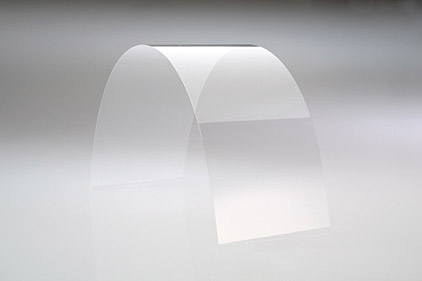
One other impact offering from Corning proves to be the applications of their Willow Glass line.  Similar to Gorilla Glass, Willow Glass will serve as a principal for OLED and LCD displays.  Unlike its counterpart, Willow Glass is geared more towards curved displays because of its thin, light and pliable characteristics.  Because Gorilla Glass is mass produced in slightly larger form factors, utilizing the “roll-to-roll” production of Willow Glass, much like that of newspapers from a printing press, will allow more cost-effective and quicker production times.  Additionally, Willow Glass can be used in smaller spaces, those the larger Gorilla Glass may not be able to be applied, while still maintaining similar, if not greater resolutions.  Simply put, Corning sees these as a means of producing quality displays where the implementation of larger glass methods may not be accessible.

However the method, it is apparent Corning hopes the continued advancements of these lines, and additional product lines, will continue to shape the interactive world of tomorrow.  I for one am impressed by the technology readily available and challenge designers implement in upcoming projects.   Furthermore, I advise any readers to visit the Corning webpage and YouTube channel to see this and many other current projects that will unlock the future, today.

YouTube Channel for Corning

Corning.com

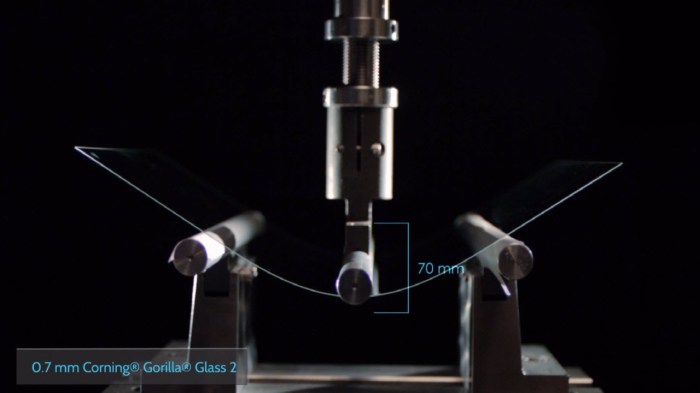
Gorilla Glass
Gorilla Glass 2 Testing (Image courtesy of Corning.com)
Willow Glass
Willow Glass Image (Image courtesy of Appliancedesign.com)

BLU LIFE ONE X (2016) REVIEW: BLU’S BUGGY BARGAIN

Blu’s Buggy Bargain, whoa, try saying that five times fast. Not easy, huh? Over the last month, I’ve had the opportunity to use, evaluate and review the Blu Life One X (2016), and for a reasonable $149.00, this is a buggy yet solid. Let me clarify the usage of the wording “solid” by implementing my self-designed definition of the word: solid – (adj) pedestrian; useful without being spectacular. I will be upfront by stating I use this word to describe many of the Life One X features, so always use this as a reference guide.

All-in-all, BLU continues to go about their business of pumping out solid…yup… devices at budget-friendly prices. For anyone willing to make some feature sacrifices, this may be an absolute bargain; with bugs.

TAKING THE TOP OFF: THE UNBOXING
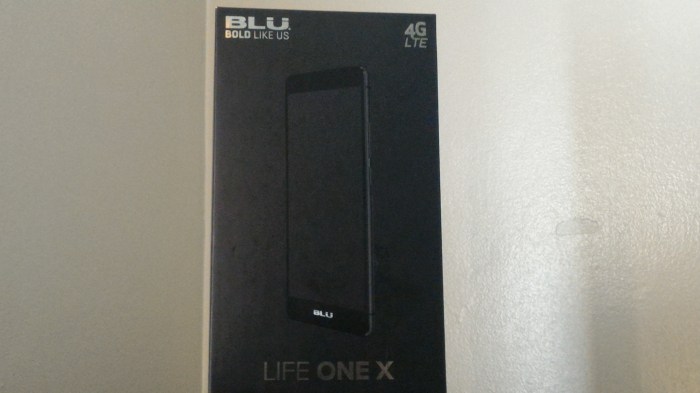
Known in the tech world as the “Budget Phone King”, many would expect an unboxing befitting the budget price in attempt to cut costs. Dare I say this is not completely the case for the Miami-based company, as the “flash factor” is present. I find it somewhat apropos as Miami is synonymous with flash and flair…I’m sending that like out to you Pitbull. More-or-less, we have a simple black rectangular box, but the 3-D device picture and sleek metallic silver branding definitely gives you a hint of style and flair. We observe this metallic silver BLU (“Bold Like Us) themed branding on both the top and bottom interior and exterior housings, the 4G LTE logo, Life One X labeling, the BLU website information (www.bluproducts.com), and FCC/Device identifications in black lettering within an adjoining white dialog box. As I often do for something notable, I give kudos, so kudos to you BLU for a nice unboxing experience.

Inside we are introduced to the phone in its plastic wrap sitting atop a velvet lined support. Seated underneath the phone, we find the standard USB 2.0 cable, charging adapter, and included headphones, all in similar wraps along with our usual manuals. Lastly, similar to other BLU devices, an included screen protector and phone case are found in the bottom of the interior housing. Low quality best describes the protector, as its not as dense or solid as a 9H or tempered one, but still nice to see its inclusion. Also, the case is reminiscent of the S-View for Samsung Galaxy phones, with an upper quadrant opening, allowing for quick view of notifications without unlocking the phone. I never found myself using it as I am not a big fan of this particular style, but again, nice to know BLU maximizes the experience with goodies not usually included by other manufacturers.

THE ENTREE: HARDWARE, SPECIFICATIONS AND PERFORMANCE
No one will mistake this phone as premium feeling, but the continued principle of solid fits so perfectly. On front we get the glossy black display with Corning Gorilla Glass 3, surrounded by a metal band and removable plastic back covering. Giving kudos once again is in order as the devices feels nice in the hand with its tapered edges, curved back that fits fabulously in the palm, and the ergonomic stylization allowing great one-hand use. Without overstating, this is not a phone in league with the HTC One M9, Samsung Galaxy S6 or Apple iPhone 6s, with their respective glass/metal bodies for the premier aesthetics and feel, but maintains a solid, simple charm.

On the right side, we find a top and bottom antenna, accompanied by the volume up/down toggle and power button. The volume toggle sits above the power button, and both have a great tactile feel. Although neither possesses distinguishing traits, I never found myself pressing one while attempting to use the other. On the left side, we find symmetrical antennas to their right counterparts and nothing else. Atop you’ll find the customary 3.5mm headphone jack sitting alone as no noise-cancelling microphone was present, and the USB port and main microphone on the bottom.

The 5.2” IPS LCD display, with a 1080p full high-definition resolution (approximately 424 pixel-per-inch density) provides a quality viewing experience. I find a close equivalent to the LG Nexus 5X as both having impressive screens, with the Nexus slightly edging out a win because of its brightness and sharper contrast. Don’t get me wrong, the Life One X boasts excellent viewing angles, but still leaves something to be desired. Possibly an uptick of sharpening and outdoor visibility may be the only thing lacking to make this one of the better 1080p, LCD screens, but still well worth the money.

Nestled on top of the front display we get the LED indicator, the earpiece and front 5 megapixel camera. I will touch more on the camera in the software section, but again, the word solid comes to mind. I never got the “oh my gosh” selfie shot, but to capture a quick picture for friends and family, or an adequate shot for social media, it will certainly suffice. At the bottom of the display, we find more BLU branding, with the noticeable subtraction being hardware navigation buttons, replaced by on-screen software ones. On the back is the 13MP camera, accompanied by dual-LED flash, and a bottom mounted grille speaker. As with other BLU devices, the speaker quality proved unimpressive with volume reaching high levels, but with distortion and devoid of great clarity. Similarly, the rear camera generates decent photos, but absent is great contrast and quality of detail. Again, solid and functional are the underlining truths to take away from the hardware aspects.

Removing the plastic back gives access to the dual-sim slots, micro-sd card slot, and the 2,900 mAh non-removable battery. I was pleasantly surprised BLU incorporated such a large battery given the size and screen resolution, and easily obtained all-day usage with above-average screen-on times; that is when the device isn’t acting buggy. Usual on-screen outputs ranged in the 3-1/2 to 4-1/2 hour range of moderate to heavy usage while checking/writing emails, viewing personal photos and video, browsing websites, taking photos, light gaming, and lots of YouTube watching. But one day, the device went berserk and flirted with full-on beast mode, after a random reboot. Even know, I’m still not sure what happened, maybe a software glitch caused something to go haywire, but I just could not drain the damn thing no matter how hard I tried. Included is a screen shot of that day, where I achieved seven (7) hours of on-screen time. The unit was scaring me so much I contacted an old priest and a young priest to be on standby in case an exorcism was needed. A clear indication of the buggy software one could incur when buying this phone. However, one aspect I actually liked quite a bit was this device sips power so efficiently when not in use. On a Tuesday during my review time, I left the phone on my desk at 97% with the screen on and screen timeout set to 30-minutes, and came back an two hours later to 96% battery remaining. Extremely impressive in my book if you ask!

Call quality falls into the okay category as incoming voice sounded clear but somewhat muted, while outgoing voice was detailed as either robotic sounding or accompanied by static interference. Data speeds in the testing area were impressive, though, with speeds averaging 27Mbps on T-Mobiles LTE bands 4 and 12. Again, I find the word solid a great way to describe the performance of the Life One X.

Powering the device is a 1.3GHz Octa-Core MediaTek processor (MT-6753), accompanied by 16GB of internal storage and 2GB of RAM, Mali-T720MP3 graphics card, and a 4G LTE support (Bands 2(1900), 4(1700/2100), 7(2600), 12(700), 17(700)) which is suitable for a majority of T-Mobile LTE bands and some AT&T bands. Although standard for other manufacturers, this is a stark deviation from other BLU devices supporting only 3G or HSPA+ speeds. The MediaTek processor demonstrates to be no match for powerhouse counterparts like the Qualcomm Snapdragon 800 series or Samsung Exynos; but, common usage will yield nice results. Additionally, by today’s standards, 2GB of RAM won’t make any jaw drop in wonderment, but my testing showed solid performance with little to no stutter. Having multiple applications opened did bog the device down, but with proper management, any hesitations in performance would be minimal. Snappy certainly is an overestimation of performance, but solid fits the description without a doubt. If we were to hop into a Delorean and go back to 2012, there is little doubt the Life One X would be viewed as an upper-tier phone of the day. Heavy gamers and photographers-in-training may want to stir clear of buying this, but for someone looking for a casual yet solid experience, it’s not a bad selection.

TELL ME MORE: SOFTWARE AND CAMERA
The words buggy and inconsistent come to mind whenever I review a BLU Device, and this is no exception. I say this with the utmost conviction, never have I reviewed a device from this manufacturer incorporating like software or devoid of glitches, and this one continues that trend. The Life One X sticks mostly to stock Android Lollipop (version 5.1); with a few icon pack tweaks, an inclusion of software customization, and other software gesturing additions. I would not call these inclusions a skinned version of Lollipop, but perhaps that is a good thing. Keeping Android closer to pure as possible is what most users appreciate, especially since the software is not at optimal performance. The included App Drawer was also a welcome inclusion, resulting in decreased need to install a third-party launcher, a big difference from previous BLU phones devoid of such feature. But, software continues to be the bane of BLU’s existence. There were several useful features included such as: double-tap to wake, screen drawing gestures to open applications, flip to silence and snooze, pocket mode, and voice unlocking, all diminished by lag and app stuttering. One such example was the screen draw gesture to open the camera, in which you would draw the letter “c” for quick access. I love this feature on all my OnePlus devices, and hoping for similar success on the Life One X. Unfortunately, the experience was marred by inconsistency in successful usage and even phantom activation. I don’t know if it was me, or if the magical camera fairy waved her wand, but this feature worked marvelously when in my pants. Trust me when I say I know possess some great photos of the inside of my pants’ pocket. Joking aside, these inclusions would be a delight if BLU provided updates to improve performance when bugs are apparent, but I am skeptical due to the company’s previous track record. The same can be said about the operating system upgrades, as we are now entering month five of Android Marshmallow, and no word from BLU Headquarters on when the switch will occur. I see this as a potential deal breaker for those looking for updates to make a more fluid experience. However, at such a great price point, many may end up overlooking this inconvenience.

Much like everything on this phone, the cameras are solid without being spectacular. The application is easy to use with almost no hiccups, and utilizes a great button layout. As stated earlier, the back camera is 13 megapixels, with a 4:3 aspect ratio, or you could drop down to 10 megapixels for a 16:9 aspect ratio. A degradation of quality is apparent in switching to the lower resolution, but proved quite nominal. One quick note about the flash I learned the hard way, it is bright and can cause some serious shadow-effect problems when used, so proceed with caution when using. I did enjoy how quickly photos were taken, with a near instantaneous render. However, I did find touch to expose quite fickle. Some of the included sample photos should show it, but if you touch on one point of a subject, you can get a near perfect shot. But if you focus just slightly off-center of that subject, there was a tendency for blown-out highlights. It was a very odd occurrence and definitely one worth noting. The back camera also records video in 720p with your choices of high, medium or low frame rate quality. I saw little difference in video quality between the high and medium settings, but a noticeable one at the low settings. Unfortunately, no 1080p video recording was included, but overall camera quality for both photo and video were; say it with me…solid.

BRING IT ON HOME: CONCLUSION AND FINAL THOUGHTS
As customary in each of my reviews, I attempt to answer the question who I would recommend this phone. Over and over I contemplated this and still have no solid answer. I guess the best answer shifts back to that word I used throughout this article: solid. If you are looking for a solid but not spectacular device at a great price, this is a device to consider. If you are not one desiring constant updates and not dissuaded by the possible lack of OS upgrades, this may be the device for you. I see this more as something a parent would buy their pre-teen or teenager as a starter phone, or for someone in need of a “filler” device until the new flagship season kicks off. I also see this as recommendation for someone traveling overseas needing an unlocked and/or dual-sim device, or for someone looking to add another decent phone to their roster. Solid, albeit with some buggy quirks, clearly defines what it is like to use the Blu Life One X. And if you are someone who can live with this, you will be pleased what your $149 buys you. One final note, if current pricing is steeper than what you would like to pay, Blu has a history of lowering prices as a device ages; so be on the look out for that in the near future.

OnePlus 2 Review: A Device Where Everything Adds Up…Almost!

OnePlus captivated consumers by producing one of the top phones of 2014, after ticking us off with the silliest invite system ever. Wait, I promised my therapist I would move on. Anyway, users and reviewers wondered could OnePlus achieve success again in 2015, with a multitude of amazing devices launched by the likes of Apple, Samsung, LG, and Motorola, just to name a few. Well, I am here to say OnePlus again stole my heart. Once you get past the self-proclaimed and overpromising Flagship Killer moniker, you realize this company possesses a firm gripe on what consumers want. This shows evident the OnePlus 2. In my opinion, arguably one of the best phones of the year and well worth purchasing.

TAKING THE TOP OFF: THE UNBOXING
Unlike last year’s OnePlus unboxing, the OnePlus 2 provides a more suitable, albeit still electrifying experience. Differing from last year’s pull-out jacket approach, this year we are greeted with a simple but stylish pull-off design. In their signature red and white stylization, we are met by a rectangular box with adorning lettering, and an impressive etch-on I can only describe as company’s new “infinity” logo. On the back, we observe the normal FCC, IMEI, and Company information regarding your particular phone identifications. Once again, the idea of simple but still very stylish comes to mind.

Upon removing the top covering, we are greeted to the phone in all its glory, enclosed in a protective plastic sleeve with the wording “ONEPLUS 2”, “NEVER SETTLE”, and the button layout indicator etchings. Underneath the device, we come upon a red jacket and inside we will find our normal array of Quick Start Guides and Manuals, which we all can’t wait to read thoroughly. Just joking! Below the manuals, are the white cutouts housing our USB type-connector cable and power adapter.

As previously stated, this unboxing experience shows OnePlus understands stylish does not need to be extravagant to enjoy. It was simple but definitely not understated.

THE ENTREE: HARDWARE, SPECIFICATIONS, AND DISPLAY
Getting back to the device, we see a gorgeous all black 5.98” overall size, with a premium looking dark grey metal band surrounding the phone frame. We find our standard 3.5mm headphone jack on top with a noise cancelling microphone and antenna, our volume up-and-down buttons with accompanying power button to the right. On back is the 13MP camera with dual-LED flash and laser optical sensor, the newly embedded fingerprint sensor/home button positioned below the display, and two grills on the bottom serving as our speaker and a secondary microphone, along with the USB Type-C port. On the front of the device we have our earpiece, ambient light sensor, LED notification light, and 5MP front camera. But one of the newest, and in my opinion, best features added is the alert slider on the left side. I know Android has software inclusions to turn notifications on or off, and also enter the phone into a silent mode, but having a dedicated button for such activities was an admirable add-on. I hope we see this in many future OnePlus devices, as well as other manufacturers should consider this a necessary inclusion. I only used it a handful of times during my testing period, but still, a very welcome addition. Much as other reviewers mentioned, no NFC is present, so this puts a damper on possible use when Android Pay and other electronic transfers becomes norm. It was not a big deal to me, as I very seldom use it anyway, but in a supposed flagship killer, there really is no excuse for its omission.

Powering the OnePlus 2 is a Quad-Core Qualcomm Snapdragon 810 (version 2) chipset (four Cortex high-powered A-53 and four low-powered A-57), coupled with an Adreno 430 and 4GB of RAM for the 64GB variant and 3GB of RAM for the 16GB variant. A little off topic, but it fascinates me manufacturers produce 16GB variants. Really? 16GB? What am I supposed to do with 16GB? Really! In my opinion, 16GB, with no SD card expansion, should be a crime against humanity! I digress, though. Also included is GPS/GLONASS, all bands of 802.11 Wi-Fi are present, Bluetooth version 4.1, USB Type-C, dual-SIM card tray (nano-SIMs). I found the performance to be more than expected for such a reasonable priced device.

Multi-tasking was a breeze with no aggressive app closings, thanks in part to the 4GB of RAM, and I enjoyed an overall fluid experience. There were a few hick-ups in daily usage, but much of that can be attributed more to flaws in the Oxygen OS software we will discuss in the next section. All-in-all, I was pleasantly pleased with the functionality and found my self enjoying web browsing, playing games, viewing videos, even writing articles, and using GPS to get around town. Without a doubt, I would give the hardware a solid “A”. Additionally, the fingerprint/home button was such a welcome addition. It is quick and easy to setup, and very responsive in its dual function. I found myself playing with it because how fascinatingly cool it was. I would not say it’s the fastest, I would give that honor to either the iPhone 6s or Nexus 6p, but the OnePlus 2 possesses one of the better ones. I also found the overheating issues of the infamous 810 chipset to be very minimal. Did the device get hot? No. Did it get warm? Sometimes when doing when heavy multi-tasking or playing graphically intensive games, but I applauded OnePlus for turning a con into a pro. Kudos! Call quality and reception were also high points as calls sounded very clear with little to no distortion, and speaker levels were well above acceptable levels. The speaker quality showed very capable during my testing period. I will never be an advocate for bottom speakers as too many shenanigans can happen (i.e. covering while playing games or videos in landscape) but the volume was on-par with other quality devices. Kudos once again, OnePlus!

Battery life proved an inconsistent aspect of an otherwise fantastic experience. I know other reviews report solid but not spectacular battery life, but I have to dispute those. My usage was hit-or-miss, with typical usage of 3-1/2 to 4 hours of moderate on-screen usage being close to normal. I did get over 6 hours of talk time (on a full charge); and yes, I am a teenage high schoolgirl from the 80s who still likes to talk on the phone for 6-plus hours. One interesting aspect of an inconsistent feature was I did get outstanding standby times. There was a Monday; I put the phone away to test another device, accidentally leaving it on after full charging. I did not even know it was on until that Thursday afternoon I heard the “low-battery” chirp. Really impressive if you ask me, but overall, I would give battery life a “C+” for inconsistency. Software updates to either Oxygen OS, or an upgrade to Android Marshmallow may rectify this problem, but be wary, for now.

Moving onto the display, I have but three words to describe it, “de-lic-ious”, I’m done. We observe a gorgeous 5.5” IPS display with a stunning 1080p (1080 x 1920, 401 ppi) resolution covered in Gorilla Glass 4. Kudos once again to OnePlus, as this display is incredible. When first observing, I honestly thought it was a Quad-HD display because of the vividness and great color rendering. I was dumbfounded when a colleague corrected me, but you see the point. Essentially, it is the same display used on the OnePlus One, but the designers did a marvelous job adjusting internal brightness and saturation levels. Looking at such a great display made the daily tasks that much more enjoyable. Kudos all around!

TELL ME MORE: SOFTWARE AND CAMERA
After the public and confusing breakup between OnePlus and Cyanogen, OnePlus was left to produce their own in-house software overlay. Queue Oxygen OS for its grand unveil! In general, I was pleased with the skin as it offered several usable features devoid in stock Android. Upon first use, it had some minor glitches including force closes of the installed messaging app, periodic non-responsiveness of the fingerprint reader, and the occasional sluggishness of memory intensive apps, to name a few. The reason these did not deter my overall satisfaction is OnePlus has been diligent pushing software updates out regularly to improve performance. So what started as often buggy and frustrating quickly turned into delightful.

If you are like me, you like to change the look of your device daily. If so, you will be elated with this mamma-jamma. Much like its predecessor, the OP2 includes several software options to change the theme, stylizations of the keyboard, adjust hardware button layout and operations, adjusting the design in the settings menu, and those are just a few tweaks. I say this seriously, if it on the phone, you have the ability to tweak it, and I really enjoy such options. It goes without saying, but I never had a dull moment playing with the customizable options. Truly, it felt like using a new device each day.

As I mention in every review, I am not much of a camera aficionado, so take my review of the camera lightly. In great lighting, I was quite impressed with the solid contrast and great detail. Additionally, the focusing proved a high point, thanks in part to the laser autofocus. Taking a shot was incredibly fluid, simple and relatively fast. Low light shots were okay with the dual-LED helping out. In general, picture quality was a solid “B”. Video was also impressive, but I did find myself frustrated by the constant auto focusing. I am not sure if this was something I was doing wrong or if it just a software issue, but I did get a little annoyed. Quality of video was actually nice. You definitely won’t make J.J. Abrahams (cheap Star Wars plug) jealous because of the quality, but the videos will be crisp and pleasurable to view.

My biggest gripe focuses around video ease of usage. There is far too many swipe up or swipe in gestures, which are similar to initiating other application functions. Often, I would swipe up or in to change a camera/video function, and all of a sudden my notification drop-down would show up, or the settings menu would initiate, little things like that. Nonetheless, I feel with continued usage, this would turn from a minor annoyance to skillful mastery.

BRING IT ON HOME: CONCLUSION AND FINAL THOUGHTS
In concluding this review, let’s look at the facts about the OnePlus 2: upper-end specs, great design and build, solid software experience, great hardware and software customizations, and a thoroughly appealing price tag. Without a doubt, this is one of my top 15 devices of 2015. Is it future proof? More or less. Is it a flagship killer? Nope. What it does achieve is it is a great device, with a great price point, you will not regret you purchased. As I always answer “…who is this for…”, and I can honestly say I would recommend this to anyone. There really is something here everyone will like with few sacrifices. Unless you just require a phone with all the top-notch bells-and-whistles, you will be very pleased. Much like the OnePlus One, the OnePlus 2 walks a marvelous line of providing a great experience and impressive specifications with a minimal price tag.

OnePlus 2 – Sample #2
OnePlus 2 – Sample #1

A Zenful Experience: The Asus Zenfone 2

Hacky pun aside, the past six months presented the opportunity to review the Asus Zenfone 2. Why did I hold off this review for so long? As you may or may not know, the period of February through November presents a plethora of devices being released. During my initial review period using this as my “daily driver”, I came to the conclusion of holding a review for a later period to give this device the alone time it needed. For this review, I observed and used the ZE551ML edition, which is the higher end variant. Let me tell you, the Zenfone 2 proves an undeniable truth budget smartphones are getting better and better, while still maintaining exceptional pricing.

TAKING THE TOP OFF: THE UNBOXING
At under $300.00, it is easy to understand a simple and minimal unboxing experience will be the expectation. The Zenfone 2 comes in a rectangular white box, with a color accent of the chosen back covering. Adorning the rest of the packaging is the standard FCC markings and information, specifications, and paint-on picture of the phone. Albeit simple, I still believe this was one of my most enjoyable experiences. Brief, but still very enjoyable. Inside the box you are immediately greeted by the device in familiar plastic wrapping. Underneath the customary safety and user guides, standard usb cable, and wall adapter. No Samsung or Apple-esqe additional earbuds, quick charging plug or anything; just another example of simple and clean. Will this unboxing wow you over as the must amazing unboxing ever? No. Just the phone and essential, all you really need.

THE ENTREE: HARDWARE AND SPECIFICATIONS
The Zenfone 2 sports a gorgeous 5.5” 1080p display on its all plastic frame. Let me tell you, this may be a plastic build in a day when metal is the craze, but this device feels great in the hand. A continuous oxymoron, the phone is both feathery while still feeling substantial. This is without a doubt one of the better built devices for under $300.00. But let me tell you about the display, WOW! I won’t lie to you and say this is the best display I’ve ever used, but it surely is beautiful to use. Using a true-color IPS display was masterful tactic by Asus as colors were accurate with sufficient saturation. Blues had a great contrast with whites perfectly done without being to warm or cold. I think the blacks could have been done better, as they sometimes appeared blue-ish to me, but regardless a great display. One bit of information I will parlay is if you get this phone, go in and turn up the brightness on the display as the preset proved to be somewhat dim. I also observed less than stellar viewing angles, as turning it off-axis makes the screen nearly invisible. But, I highly recommend this to anyone who loves watching media or surfing the web, or for you business-heads needing a great device for writing or reviewing documents.

In LG-esque fashion, Asus placed the volume buttons on the back, in which they are easily accessible by your index finger. But, in an epic fail fashion, the power button is found on the middle-top of the device. Not only that, the power button is near flush with the body, so using it will be a frustrating endeavor. Luckily, much like its LG counterparts, the screen allows you to initiate a wake-up with a double-tap. Nice recovery from a disappointing flaw! The speaker is found at the bottom right and demonstrated admirable sound. The quality was very impressive, being both loud and clear, with only a slight hint of robotic sounding. Once again, a striking feature for a sub-$300 device.
Inside you will find the 64-bit Quad-Core Intel Z3580 chipset clocked at 2.3Ghz, this is also one of the first devices with 4 GB of RAM, along with a PowerVR G6430 graphics card. Now, the Intel Atom is more of a power and battery sipper, but don’t be fooled as this bad boy hums through everything I threw at it. Applications open with very minimal lag, gaming truly proved an incredible endeavor, and for you workaholics like me, I was able to run both light and heavy word processing program on this device with a breeze. Having the 4 GB of RAM (approximately 3.9 available with ZenUI using roughly 1.5 GB for System Resources) allowed for extensive multi-tasking with little-to-no aggressive application termination.

Alongside the aforementioned power-sipping Intel Atom chip we find a 3,000 mAh battery. For me, this one of the few inconsistency of the phone, and slightly lowered my love for the device. One would imagine with the large battery coupled with an efficient chip and GPU, battery life would be tremendous; and some days it was. Overall, any level of consistently good battery life was not present. Now, this could be attributed more to the ZenUI software overlay and the unimpressive battery management of Android Lollipop, but on most days I was able to achieve between 3-1/2 to 4 hours of on-screen usage, with standby time of roughly 27 hours. One won’t confuse this device as an energy powerhouse, but it definitely should get you through a full day and then some without needing to reach for the charger. But, should you have one of those inconsistent days, it supports quick charging with claims of 60% charge within 40 minutes. My experience would affirm this as one day I was able to charge from 14% to full in just under an hour and seventeen minutes.

Intel included dual-sim slots, something I wish was more prevalent in U.S. variants, and get this, an SD card slot. Yes, an SD Card, a feature seemingly going the way of the dinosaur by data Nazi phone makers. All jokes aside, the dual-sim slots was very welcomed for someone who usually cares two devices, one for work and one personal, allowing to compress to one phone usage. Additionally, the SD Card slot, which is read and write accessible, just gave me goose bumps, as I am a media junkie and frequently need to save documents. The installed antennae proved very capable as in my carrier areas, maintained exceptional reception along with nearly crystal clear call quality. Data was another notable feature as the include Cat 4 chip carries nine U.S. LTE bands with 150/50 Mbps speeds. Additionally, 802.11 Wi-Fi supporting a/b/g/n/ac bands proved quite an impressive addition.

TELL ME MORE: SOFTWARE AND CAMERA
Truth be told, I do like Android in stock version, with that being said, I must attest ZenUI makes me ponder if a skin can be useful. In this case, I would say timidly “kinda”. ZenUI turned out to be a heavily skinned version of Android Lollipop, and as I mentioned before, can take up a lot of the operational memory. However, I did find several features to be quite useful add-ons to Android. Usable features such as the theme engine, memory power booster and power saver, one-hand operation, ZenMotion, and easy mode demonstrated pre-installed applications I enjoyed, and made daily usage that much more pleasurable. Even the FM radio was a welcomed addition I found myself listening to when doing my daily walk. But, the best added feature of ZenUI was the display adjustment feature allowing users an interface to adjust filters, make modifications to the brightness and contrast, or tweak the saturation levels. For me, this should be a must have in all devices going forward, and I give kudos to Asus for its inclusion. One gripe I do have is about the button layout and placement on the keyboard. Truthfully, I actually enjoy the keyboard’s overall functionality, but because the space bar is so low and near the device home button, often I found myself hitting the latter by mistake. Also, I had to get use to where the arrow for initiating uppercase letters on the Google keyboard would be, Asus put it higher and in its stead put a settings menu key. Not a big deal, but often I would be delayed in completing a text message or document when I would hit this instead of starting an uppercase letter. Once again, a minor annoyance but an annoyance nonetheless in an otherwise great experience. In general, the software use was incredibly smooth, responsive and enjoyable to use. Despite the gluttony of pre-installed Asus-branded applications aside, I must give the experience a solid B+.

On to the camera, which I thought would be a low-point of an otherwise enjoyable device. Much to my surprise, for the price, this proved a solid camera. I definitely wouldn’t crown it a Galaxy S6 or Galaxy Note 5 killer in terms of the camera production, but it produced clear photos, in the right conditions. I will include some photos for review, but this 13MP camera took great photos in both great lighting and low lighting. You can see some noise and lack of range on the low-light shots, but all-in-all quite impressive. The installed filters could use improvement in future Asus or  Android software updates, as sometimes in darker conditions, I found some misses in contrast accuracy, but the dual-tone LED flash helped along with tweaks within the camera software to clean some of this up. I was informed there is no IS (Image Stabilization) but I honestly did not observe an impairment in either photo or video. But, as I mentioned, I will include samples for your review. Video was nice with the 1080p capture at 30fps, and the microphone demonstrated nice audio pickup. Again, for the price you pay, you get a great camera with quality better than the price tag would parlay.

BRING IT ON HOME: CONCLUSION AND FINAL THOUGHTS
As I normally do in my reviews, I answer the question of who would this phone be best suited to please. Honestly, this is a rare one I would recommend to everyone. Whether you’re a converted iPhone user, Nexus Junkie, Stock Android Lover, or customizing fiend, there is a little bit of everything to like here. The theme store will allow for interactive customization in all aspects of the device, keeping the typical user from getting bored. The strong CPU and GPU would allow gamers, up to the moderate usage levels, an enjoyable venture. Those small business owners would enjoy the dual sim capability for both personal and work phone, as well as the vibrant display to type documents or review presentations.

Truly a device super ceding its price tag, this is a great buy for anyone looking for a new phone, or looking for a great gift for someone else this holiday season. My only caution is to thoroughly review which model you picked as Asus made way too many variants of this phone. But at the end of the day, you will be happy with this purchase and find yourself realizing great devices do not need to have hefty price tags.